A social media approval workflow is the set of review steps and roles that moves a post from draft to published, with the right people signing off along the way. To keep it fast, agree a review window for each type of post, name a backup for every approver, and keep a full audit trail of every decision.
You’ve got a campaign launching on Thursday, and the posts are written by Tuesday.
Between those two days, your posts might need to be approved by:
If one of those four reviewers is out, Thursday’s launch can slip to Monday.
And the stakes are high because teams doing this type of work are small. In Emplifi’s State of Social Media Marketing 2026, 57% of the 564 marketers surveyed said their social team has fewer than six people.
With a team that size, every hour spent chasing sign-offs comes out of the same few people’s week.
The fix starts with how approvals are set up. Here’s how to get it right.
They break down because email and spreadsheet tools weren’t built to route a social post or record who approved it.
A shared spreadsheet only holds manual inputs, and an email thread shows whoever replied last.
Running approvals this way leaves four gaps:
For a team running social across several brands and markets, each brand and market adds another set of threads to track.
The people chasing those sign-offs are already stretched: in the same Emplifi survey, 76% said they feel burnout at least occasionally.
We’ll show you how Emplifi Publisher routes drafts through legal, brand and regional reviewers before anything publishes.
A good social media approval workflow sends each post to the reviewers it needs, in the right order, and keeps a record of every decision along the way.
Follow these four design principles to create a solid approval workflow for every social post:
Decide which posts need Legal and which don’t.
For example, an organic product post might need only a brand check, while a post with a pricing claim or a health statement goes to Legal first, and a crisis response is sent straight to your communications lead.
Write those tiers down, so whoever drafts a post knows its route before it goes anywhere.
Here’s an example of a one-page list:
Agree on the list with Legal once and revisit it each quarter. Routine posts then stay out of Legal’s queue.
The tier list belongs in your wider enterprise social media governance policy.
Decide who approves what by role, so the approval workflow survives vacations and job changes. For example:
When the brand manager is on leave, a named deputy picks up the queue. Write that deputy into the process, so nobody has to guess who’s covering.
Give each tier its own review window. In the example table, a reactive post on a trending topic gets four hours, while a localized campaign post gets two business days.
Then decide what happens when a window runs out. Set it up so the post moves to the backup approver, then to the head of digital marketing, for example.
Write these rules in the same document as your tier list, so the whole team works from one version.
Log every approval and rejection with the reviewer’s name and a timestamp, plus the reason for each rejection.
When a compliance question comes up after a post goes live, the trail shows who approved it and which version they saw.
Keeping the trail inside the publishing tool also covers the last step, between sign-off and publish, because there’s no manual copy step.
Emplifi Publisher’s approval workflows route every draft through multi-stage review before anything publishes, with legal, brand and regional reviewers in the order you set.
A reviewer who spots a problem rejects the post back to an earlier stage with a reason, so the writer knows what to fix. Profile roles decide who can publish directly and whose posts need approval first.
Approval workflows are configurable across regions and brands, and teams only see the content and accounts relevant to them. Every action is logged in a full audit trail.
If something goes wrong after posts are scheduled, Crisis Emergency Stop halts all scheduled content at once.
Jägermeister, for example, brought its regional accounts into one workspace and runs its brand and legal reviews through a single audit trail.
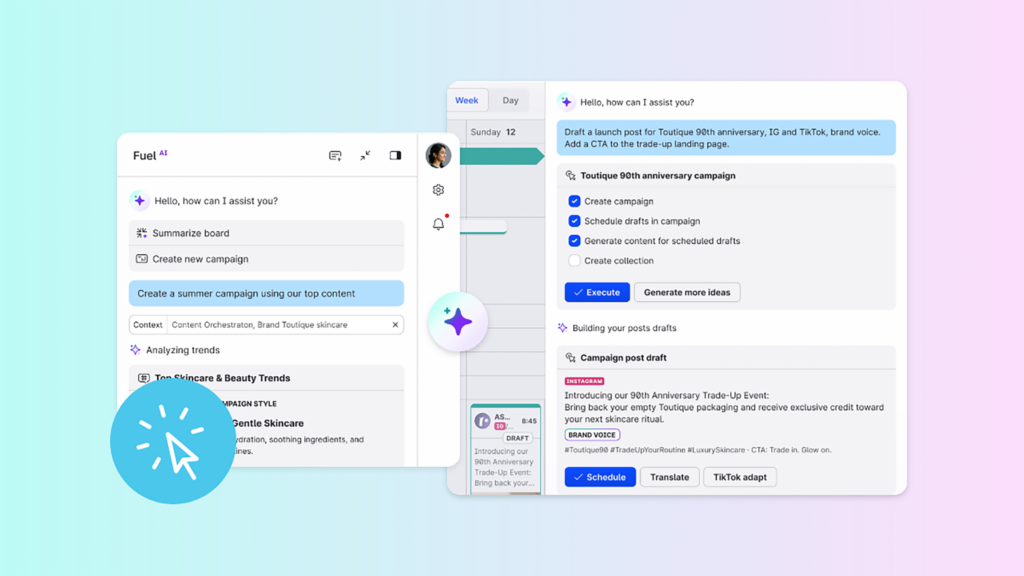
Fuel AI, the agentic intelligence layer built into Emplifi Fuel, learns your brand voice to keep drafts consistent.
In Emplifi Publisher, AI Composer writes social copy and translates it into more than 30 languages, so a team in Madrid and a team in Chicago start from the same message.
Use review time for the judgment calls a person has to make, such as whether a claim holds up or whether a joke fits the local market.
Legal and Procurement each sign off on something different, so provide each team with its own checklist.
Before Legal reviews an AI-assisted publishing workflow, write down your social media content approval process and prepare these four things:
Emplifi holds SOC 2 Type II and ISO 27001 certifications and uses role-based access controls to protect data in the cloud, as listed in the Emplifi Trust Center.
For data residency, ask every vendor for its hosting and data processing terms in writing, and have Legal check them against your own requirements.
Give Procurement the numbers. If drafts live in one tool and approvals in another, count the licenses and the hours your team spends copying posts between them.
Emplifi Publisher covers the whole path from first draft to approval to published post in one place, so you can compare it line by line with the tools you use now.
For the wider view, read how content orchestration differs from content management.
A faster approval process doesn’t come from asking reviewers to work faster. It comes from sending each post only to the people its risk calls for.
When routine posts stay out of Legal’s queue, Legal can spend its time on the pricing lines and health claims that need a legal read. A named backup and an agreed review window keep a launch on schedule when an approver is out.
Emplifi Publisher keeps content creation, approvals and publishing in one place, so the audit trail covers every step from draft to live.
Ready to take the chasing out of your approvals? Book a demo with the Emplifi team to see multi-stage approval workflows in action.
It’s the set of review steps a post goes through before it publishes, with each step owned by a role such as a brand manager or Legal. A good one sends each post only to the reviewers its risk level calls for.
Match approvers to the post’s risk tier. For example, send routine posts to a brand or social lead, and pricing and health claims to Legal. Crisis responses belong to your communications lead, and every role needs a named backup.
Send only high-risk posts to Legal, and agree on a review window for each tier with a backup approver. Routine posts then wait only for their own reviewer, and Legal’s queue holds only the posts that need a legal read.
It’s the set of policies and approval rules that decides who can publish what on a brand’s accounts, and how decisions are recorded. Emplifi’s social media governance guide covers how to set one up.
Ask your Legal team what your industry’s rules require. Where a record is needed, an audit trail shows who approved each post and which version they saw.
Set your workflow up so it does: AI-drafted posts go through the same reviews as any other draft. Emplifi Publisher routes every draft through multi-stage approval before it publishes, and Fuel AI learns your brand voice to keep drafts consistent.
Emplifi Publisher routes drafts through multi-stage approval workflows before publishing, and reviewers can reject a post back to an earlier stage with a reason. Every action is logged.