EMPLIFI FUEL AI

Tell Fuel AI what you need. It gets it done. You approve everything.

See how our agentic layer saves you hours

Tell Fuel AI what you need. It gets it done. You approve everything. See how our agentic layer saves you hours

Blog
11 min read
Nov 12, 2026

How to plan a social media campaign with AI: from brief to results

To plan a social media campaign with AI, start from a short brief and let an AI tool draft the plan your team then reviews. Fuel AI, the agentic intelligence layer built into Emplifi Fuel, turns a one- or two-sentence description of the campaign into a draft plan based on your top performing content and audience patterns. Your team edits the plan, and nothing goes live until they approve it.

Emplifi Team Social Media Marketing Experts
A social media team plans a campaign together while a colleague maps it out on a whiteboard

Key points

  • A campaign plan turns an approved brief into dated, channel-specific posts your team can run
  • Fuel AI drafts the plan from a one- or two-sentence description, basing it on the content and audience patterns that have performed best for you
  • Nothing is created or published until your team approves it
  • Results are measured against the KPIs you include in the brief

If you plan social campaigns, you’ve probably noticed the calendar filling up faster.

Most marketers (86%) say their content and campaign volume grew in the past year, according to Emplifi’s State of Social Media Marketing 2027 survey of hundreds of marketers in the US, UK, Australia and New Zealand.

Each of those campaigns starts with a brief. Someone then has to turn it into a dated plan for every network and get it signed off before anything goes out.

Below, we walk through that planning step, using Fuel AI for social and care teams as the worked example.

In this guide, you’ll learn:

  • What a campaign brief needs before AI can plan from it
  • How to go from a two-sentence description to an approved plan with Fuel AI
  • What a seven-day plan looks like, with a worked example
  • Who approves what, and how to measure the results

What should a social media campaign brief include?

A social media campaign brief should cover seven things, each short enough that the whole brief fits on one page:

  1. The objective, written as one business outcome
  2. The audience, split by market if you run more than one
  3. The networks the campaign will run on
  4. Start and end dates, plus any fixed moment such as a launch day
  5. The offer or call to action
  6. The KPIs, with a target for each
  7. The tone, and anything the campaign must not say

The objective matters more than anything else in social media campaign planning, because it decides which KPI you report at the end.

Most teams default to reach: 58% of marketers put reach and impressions among their three most-reported KPIs in Emplifi’s State of Social Media Marketing 2027, while only 40% include conversion rate.

If the campaign exists to sell a product, write conversion rate or product page clicks into the brief, so you can measure the campaign’s direct impact on sales.

Give the campaign a fixed launch day too. Posts before it build anticipation, and posts after it can count down to the end of the offer.

Keep the brief to what a planner needs. The full pre-launch list, including asset sign-off and paid budget, lives in our campaign planning checklist template.

Find out where AI is saving social teams time

Get the data from hundreds of marketers in the US, UK, Australia and New Zealand on where AI saves hours and how teams prove social ROI to leadership.

How do you plan a social media campaign with AI?

You plan a social media campaign with AI by describing it in a sentence or two, then reviewing and editing the plan the AI drafts before you approve it.

Here’s how that works in Emplifi with Fuel AI, in four steps.

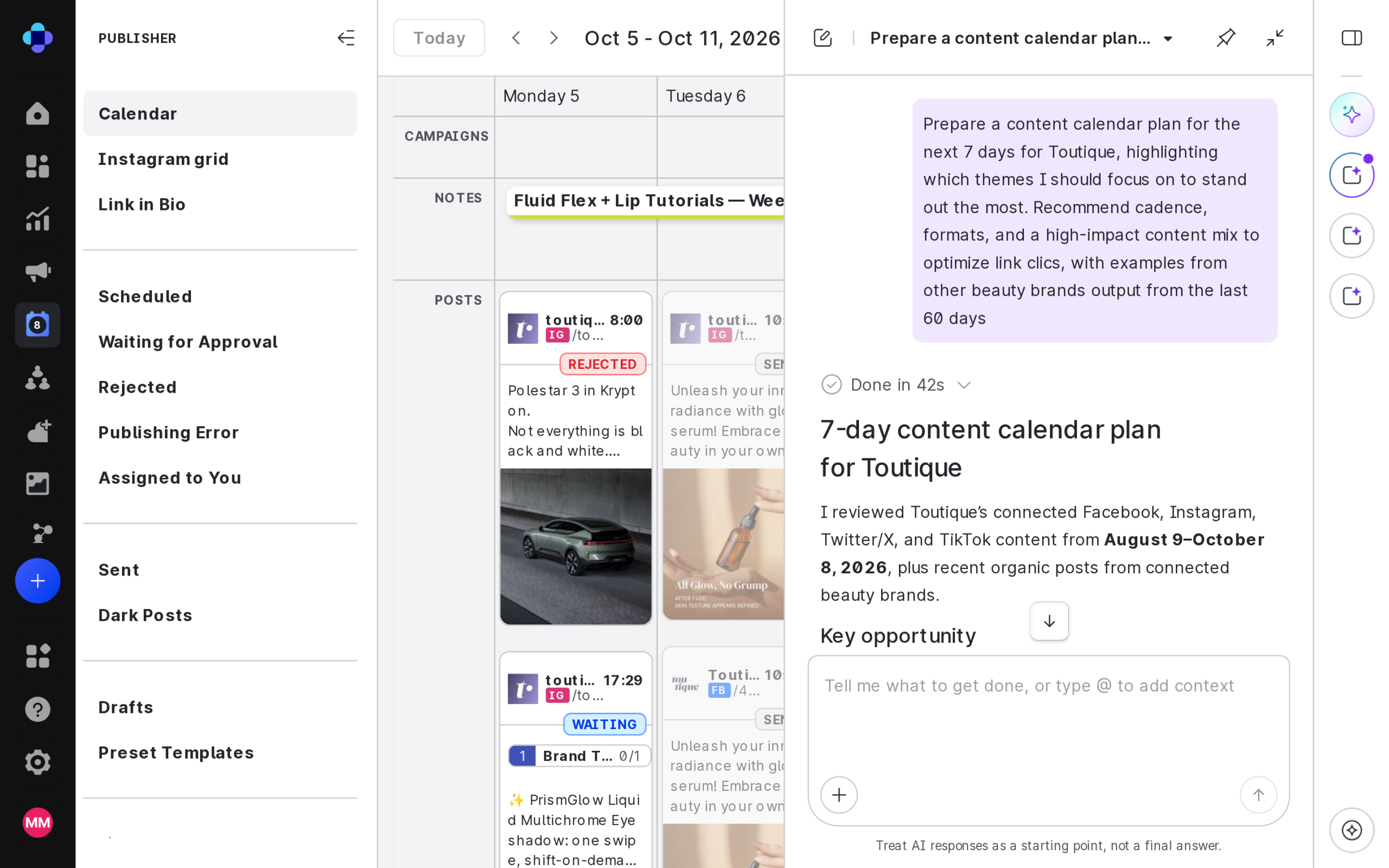
1. Tell Fuel AI about the campaign

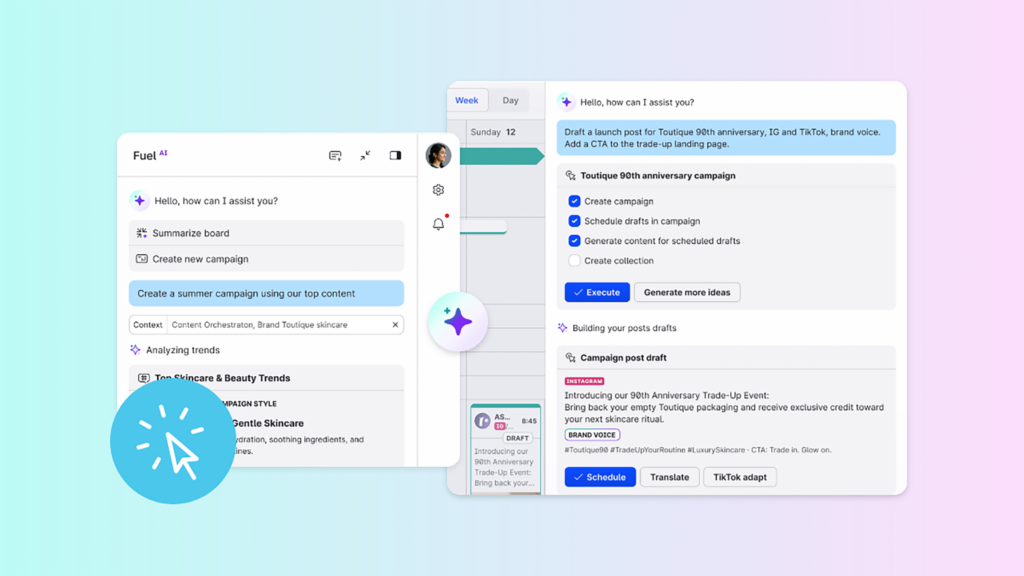
Describe the launch in one or two sentences.

Fuel AI analyzes your top performing content and audience patterns, then drafts a campaign plan for you to review and edit. Nothing goes live until your team approves it.

Take the objective, dates and networks straight from your brief, so the first draft starts from facts your team has already agreed.

The Fuel AI chat panel open beside the Emplifi Publisher calendar, replying to a request with a 7-day content calendar plan

2. Review the plan Fuel AI drafts

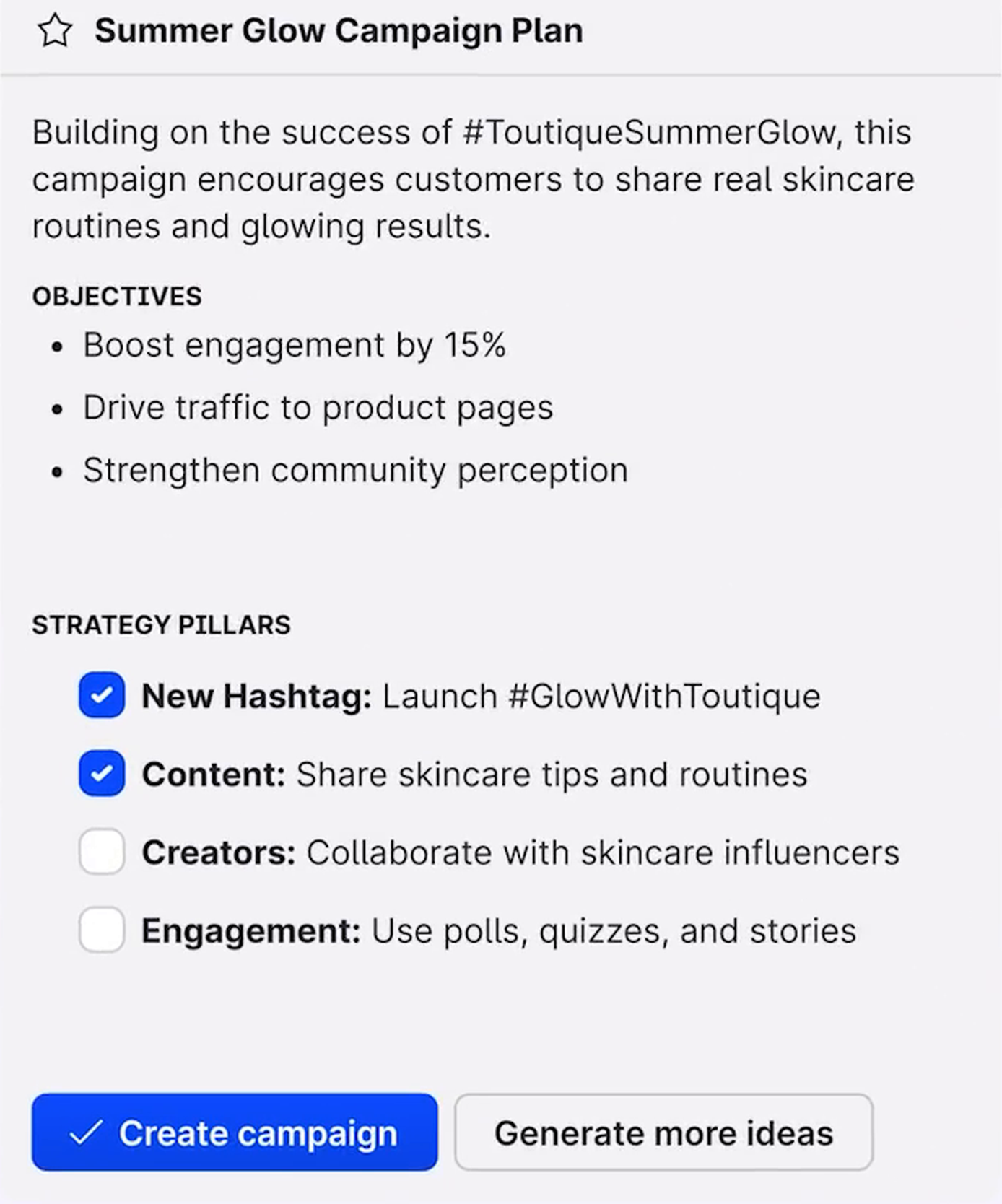
The draft sets out the campaign’s objectives and the strategy pillars it proposes. Check the objectives against your brief first: if the brief asked for product page clicks and the draft leads with engagement, that’s your first edit.

Strategy pillars are the themes the campaign’s posts are built around, such as product education or customer stories.

Keep only the pillars your team has the photos, videos or copy to deliver. A pillar without them leaves days in the plan with nothing to post.

Finally, check the tone and the must-not-say lines in your brief, market by market.

A campaign plan drafted by Fuel AI, listing objectives, strategy pillars with checkboxes and the Create campaign and Generate more ideas buttons

3. Ask for changes in plain language

Edit the draft directly, or ask Fuel AI for changes in plain language, such as moving the launch post to Wednesday or replacing a customer stories pillar with product education.

If none of the proposed pillars fits, “Generate more ideas” on the plan card suggests new themes.

Make one change at a time, so you can see exactly what moved.

4. Approve the plan

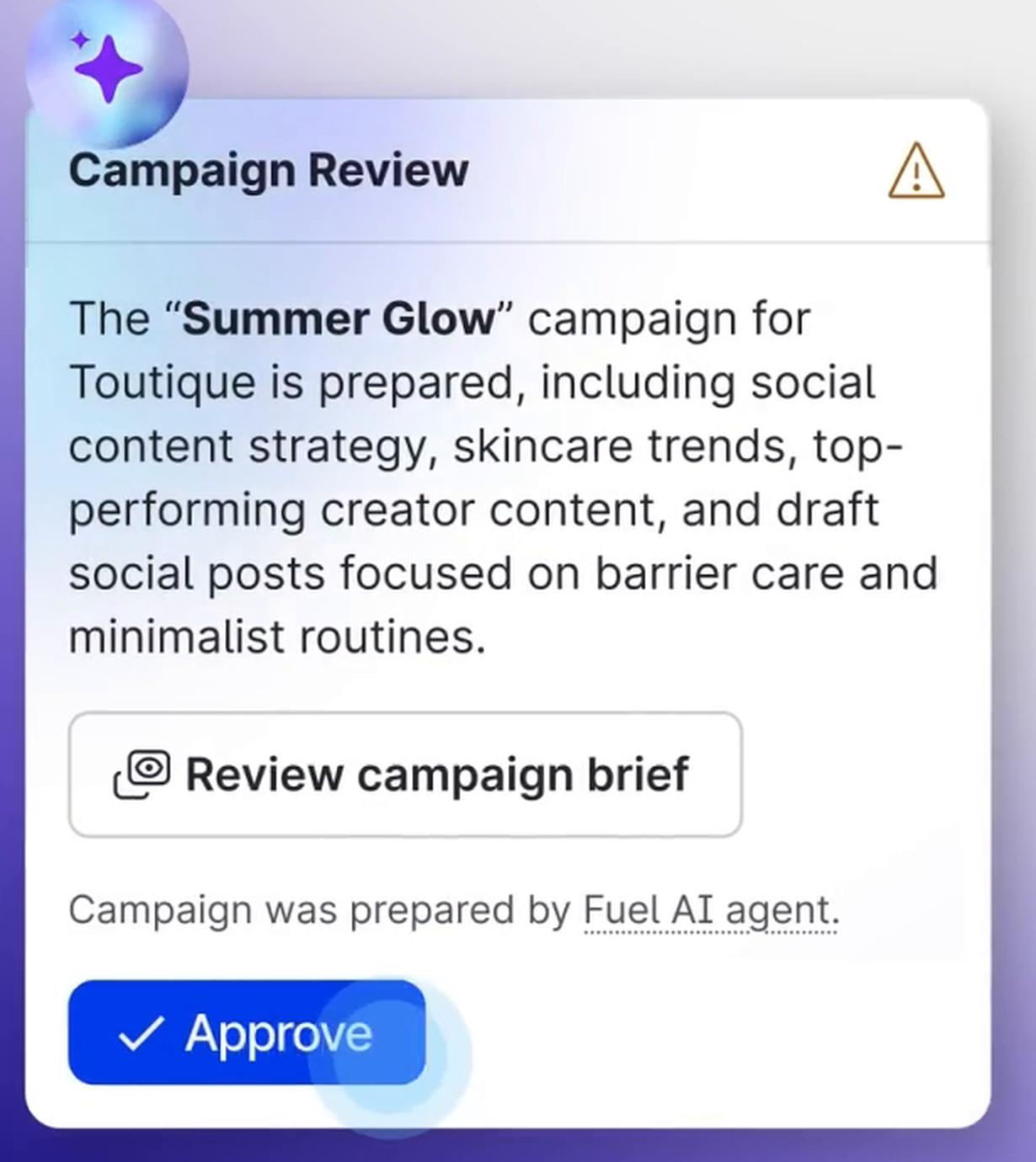
When the plan matches the brief, Fuel AI asks for your approval before it creates the campaign.

The review card says the campaign was prepared by the Fuel AI agent and links to the campaign brief, so whoever approves can read it before they click Approve.

The Campaign Review card noting the campaign was prepared by the Fuel AI agent, with Review campaign brief and Approve buttons

Scheduling and tracking happen in Emplifi Publisher, Emplifi’s social media publishing platform:

  • The Campaigns feature groups your content under a shared brief and timeline
  • PrimeTime schedules content to predicted peak engagement windows
  • UTM tracking is built in and automatic, so clicks are tagged to the campaign without manual work

For how Fuel AI drafts the individual posts and sends them for approval, read how Fuel AI writes and approves social content.

Click the image above to start the interactive tour and see Fuel AI turn a single brief into channel-specific posts, routed for approval.

What does a 7-day campaign plan look like?

A seven-day campaign plan maps each day of the campaign to its main post and the job that post does.

The example below is a fictional illustration of the kind of plan you’d review and approve: an outdoor brand launching a trail running shoe in the US and UK, with both markets posting on the same days in their own local copy.

Its brief reads: “Launch our new trail running shoe to runners in the US and UK over seven days, with a 10% launch-week code. Goal: 4,000 product page clicks.”

Day Channel Theme Format Goal
Day 1 (Monday) Instagram and TikTok Teaser: the trail that inspired the shoe Short-form video Reach
Day 2 Instagram Design story: grip and weight Carousel Engagement rate
Day 3 (launch) Instagram, TikTok and X Launch and the 10% code Video with product link, plus a live Q&A thread on X Product page clicks
Day 4 TikTok A runner tests the shoe on a muddy trail Creator video Reach
Day 5 Instagram and TikTok Answers to the top questions from launch day Short video replies Engagement rate
Day 6 Instagram Stories Fit guide: choosing your size Stories with link Product page clicks
Day 7 Instagram and TikTok Last day of the launch code Short video and Stories countdown Product page clicks

The first two days build awareness before the link goes live, so the Day 3 launch post reaches people who have already seen the shoe.

Mid-week posts answer the questions launch day raises, and Day 7 uses the code’s deadline as its reason to post.

Every day works toward the brief’s one target of 4,000 product page clicks: the reach and engagement days build the audience that the link days convert.

For the month view around the campaign, start from our social media content calendar template.

See Fuel AI draft a campaign plan

Bring your next campaign brief and see the plan Fuel AI drafts from it.

Who approves what when AI plans the campaign?

Fuel AI asks for your approval before it creates or deletes anything, and it can only do what each user’s permissions allow. Every request is logged, so your team can always see what Fuel AI did and who asked.

Agree the human sign-offs before the campaign starts. For example:

  • Your head of digital marketing signs off the objective and KPIs in the brief
  • Your social media leader approves the campaign plan
  • Your brand, legal and regional reviewers approve each post before it’s published

Sign-off often holds campaigns up: 22% of marketers name internal approvals as their single biggest workflow bottleneck in the State of Social Media Marketing 2027.

Agreeing the plan once, before any post is drafted, gives reviewers something concrete to check each post against.

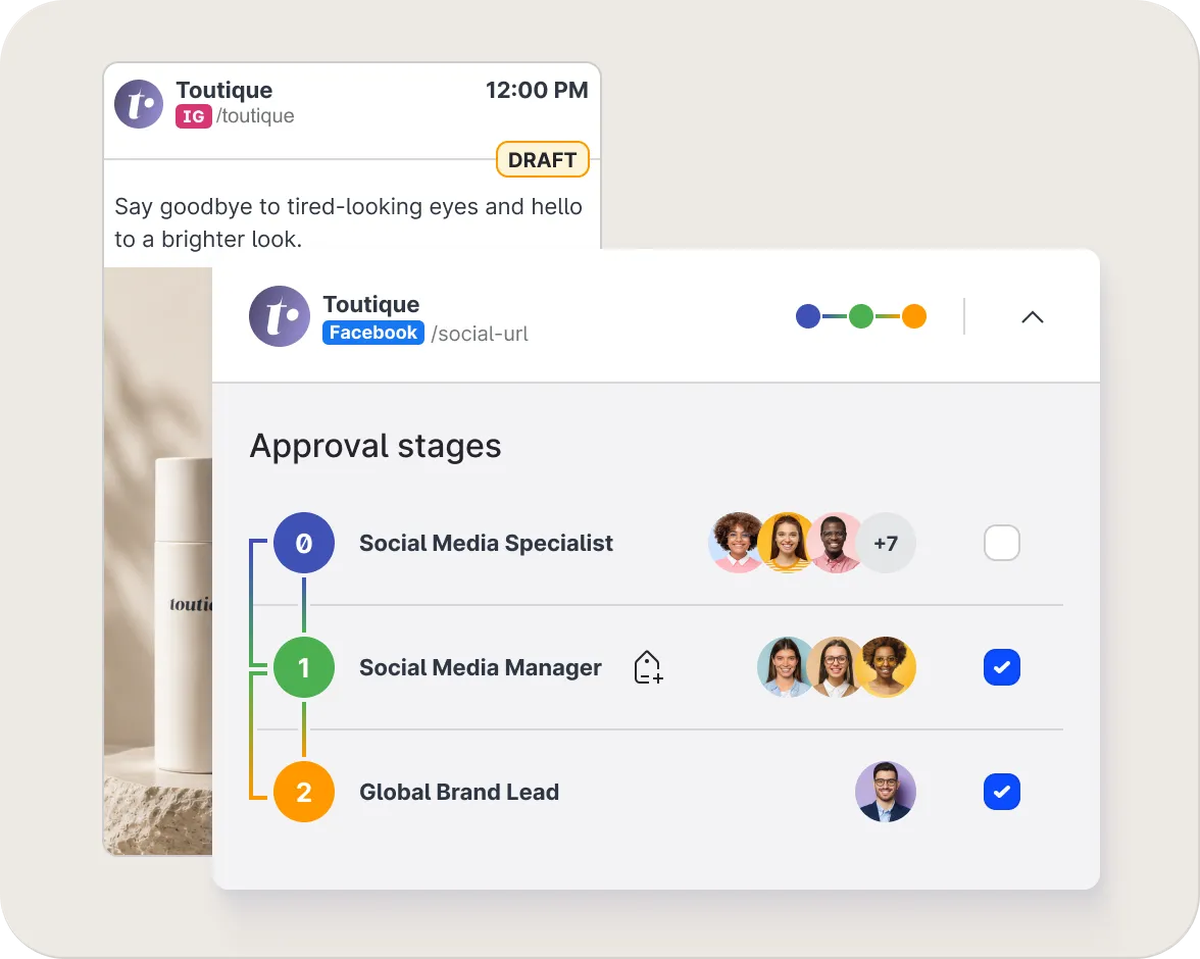
Post approvals run in Emplifi Publisher, where multi-stage approval workflows route each draft through your legal and regional reviewers, with a full audit trail of every action.

Emplifi Publisher showing three approval stages on a draft post: Social Media Specialist, Social Media Manager and Global Brand Lead

How do you know the campaign worked?

You know the campaign worked when the KPIs in the brief reach their targets, so measure those first. For the trail shoe launch, that means product page clicks against the 4,000 target, counted through the campaign’s tracked links.

Reporting takes real time: 62% of marketers spend four or more hours a week on reporting and analytics, according to the State of Social Media Marketing 2027.

AI is already easing that load: 69% of marketers say it has saved their team three or more hours a week on reporting.

Fuel AI builds Unified Analytics reports from a plain-language request. Ask it to build a board of the launch week’s performance by network and explain which content drove the results, then read it in Emplifi Unified Analytics, Emplifi’s social media analytics platform.

Because the board shows which content drove the results, you can see which days of the plan delivered without checking each post by hand.

If the Day 4 creator video reached more people than the launch post, put more creator content in the next brief.

Plan, approve and measure campaigns in one place

See how Fuel AI and Emplifi Publisher take a campaign from brief to approved plan to results.

Where does campaign planning still need people?

AI drafts from what has worked before, so it’s at its best when past performance is a good guide.

That’s also where it stops: a brand-new creative idea has no history to draft from, so the big idea still comes from your team.

Here are two examples where you’d definitely want a person to make the call:

  • Local context: a regional manager knows the local holiday or story that changes what a post should say in their market
  • Breaking news: when news breaks on launch day, someone on your team decides whether to hold the posts

Most teams already feel the time AI saves: 87% of marketers say it has improved their productivity, though just 38% call the increase significant, according to the State of Social Media Marketing 2027.

Put the hours it frees up into calls like these.

Final thoughts: Start with your next brief

Pick the next campaign on your calendar. Once its brief is written, two sentences with the objective, its KPI and the dates are enough for a first draft plan.

See how Fuel AI for social and care teams turns that into a plan, and compare the time from brief to approved plan with your last campaign.

Ready to plan your next social media campaign with AI? Book a demo with the Emplifi team to see Fuel AI draft a plan from your brief while your team keeps the approvals.

About the data: The State of Social Media Marketing 2027 is Emplifi’s survey of hundreds of marketers in the US, UK, Australia and New Zealand, run with Alchemer in September 2026.

Frequently asked questions

AI needs the main facts from your brief: the objective with its KPI, and the dates the campaign runs. Add the audience and networks if they differ from your usual mix.

Fuel AI drafts from your top performing content and audience patterns, so a one- or two-sentence description is enough to start, and you add detail as you edit the draft.

AI drafts the plan, and people approve it. Fuel AI asks for your approval before it creates or deletes anything.

Whatever tool you use, check what it can create without a person approving it. In Emplifi’s State of Social Media Marketing 2027, 51% of marketers say they use AI tools their company hasn’t approved at least some of the time.

No. A campaign plan covers one campaign with fixed dates, while the content calendar holds everything your team publishes, campaign posts included.

Keep both in one publishing tool, such as Emplifi Publisher, which shows campaigns on the same calendar as your other posts. That way you can spot a campaign post that clashes with always-on content before either goes out.

A social media strategy sets the goals and channel mix for all your social work and is reset every quarter or so. A campaign plan covers one campaign with fixed dates and turns one goal from the strategy into daily posts.

Our social media strategy framework covers the strategy side, and our guide to campaign coordination across paid, owned and earned covers lining campaigns up across channels.

The KPIs from the brief belong in the plan, one primary KPI per objective, each with a target: product page clicks or conversion rate for a sales campaign, reach for an awareness push. Tie them to revenue where you can.

Only 48% of marketers say their team can confidently demonstrate social media ROI to leadership with clear attribution and data, according to Emplifi’s State of Social Media Marketing 2027.

Ready to fuel your teams with A-CX?

Discover what Emplifi can do for you. We turn small teams into large ones, and large teams into well oiled machines, but either way, we offer the rocket ship, you just need to jump on.

What can you expect?

  • A live walkthrough of Emplifi Fuel tailored to your specific social marketing, commerce, and care needs
  • A benchmark of how your brand performs against peers in your industry
  • A partner who understands your business, and 22,000 others
  • A concrete action plan to go from disjointed teams to A-CX
Get a demo
This site is registered on wpml.org as a development site. Switch to a production site key to remove this banner.